
 By concept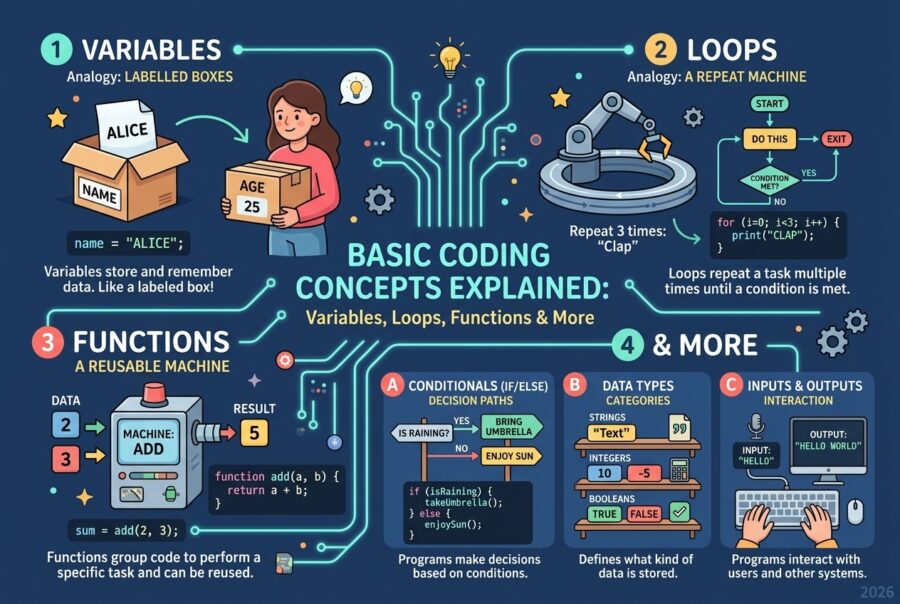
Basic coding concepts are the universal building blocks behind every program: storing data, making decisions, repeating work, and organizing logic into reusable pieces.
Once you understand variables, data types, operators, conditionals, loops, functions, and collections, learning any language becomes mostly a matter of syntax — not starting from zero.
If you have ever felt that programming is a wall of jargon, this guide is the map. The ideas below appear in Python, JavaScript, Java, C#, Go, and almost every mainstream language. Master the concepts, and the curly braces will stop feeling random.
Key Takeaways:
- Coding concepts transfer across languages
- Variables store state; types define meaning
- Conditionals decide; loops repeat
- Functions package reusable behavior
- Collections organize groups of data
- Algorithms are clear steps, not magic
- Errors are feedback — read them carefully
- Fundamentals beat framework hopping for long-term progress
Background: What “Coding” Really Is?
Coding (programming) is the craft of giving a computer precise instructions. Computers are extremely fast and extremely literal. They do not infer what you “meant.” They execute what you wrote.
That is why beginners struggle less with “being bad at tech” and more with learning to think in:
- State — what information exists right now
- Control flow — what happens next, and under what conditions
- Abstraction — how to name and reuse useful behavior
Programming languages differ in style, but they share a common conceptual core. A variable in Python and a variable in JavaScript solve the same human problem: remember a value and refer to it later.
The Core Basic Coding Concepts
1) Variables: Named Storage
A variable is a labeled container for a value.
Analogy: a box with a name on it. The name is how your code finds the value.
What variables let you do:
- Store user input
- Track scores, totals, counters
- Hold temporary calculation results
- Update state as a program runs
Good variable names read like English: totalPrice, isLoggedIn, studentCount. Bad names (x1, temp2, data) hide meaning.
Constants are values you do not intend to reassign (for example, a fixed tax rate). Many languages provide a way to signal that intent.
2) Data Types: What Kind of Value You Have
Not all data is the same. Data types tell the program how to interpret a value.
Common beginner types:
- Numbers — integers and decimals
- Strings — text
- Booleans — true/false
- Null/None/undefined — intentional absence of a value (language-specific details vary)
Why types matter:
- You cannot meaningfully multiply a name by a date
- Sorting numbers differs from sorting text
- Conditionals depend on true/false logic
Some languages are strict about types; others are flexible. Either way, you should still know what kind of data you are working with.
3) Operators: Doing Work on Values
Operators combine or transform values.
Categories you will use constantly:
- Arithmetic: + – * / %
- Comparison: == != < > <= >= (exact syntax varies)
- Logical: and/or/not or && || !
- Assignment: store a result into a variable
Operators are how raw data becomes useful decisions and calculations.
4) Conditionals: Making Decisions
Conditionals let programs choose paths.
The classic pattern:
- If a condition is true, do one thing
- Else, do another
- Optionally handle multiple branches
Real examples:
- If password is correct, allow login
- If inventory is zero, show “out of stock”
- If score is above threshold, grant a badge
Without conditionals, software cannot respond to different situations.
5) Loops: Repeating Actions
Loops repeat a block of code without copying it.
Common forms:
- For loops — repeat over a known range or collection
- While loops — repeat while a condition stays true
Use cases:
- Process every item in a list
- Retry until success (with safeguards)
- Generate sequences
- Animate frame-by-frame logic in simple programs
The key risk is the infinite loop: a condition that never becomes false. Always ensure progress toward exit.
6) Functions: Reusable Blocks of Logic
A function packages instructions under a name.
Benefits:
- Write once, use many times
- Reduce duplication
- Isolate bugs more easily
- Make programs readable in “chapters”
Functions can accept inputs (parameters) and optionally return an output.
Thinking in functions is a major step from “scripts that run top to bottom” to “systems you can maintain.”
7) Collections: Groups of Data
Most programs handle more than one value.
Beginner-friendly structures:
- Arrays / lists — ordered sequences
- Objects / dictionaries / maps — key-value associations
- Sets — unique values (in languages that provide them)
Examples:
- A list of high scores
- A user profile with name, email, age
- A shopping cart of product IDs
Collections + loops are the engine of real applications.
8) Algorithms: Step-by-Step Problem Solving
An algorithm is a clear sequence of steps to solve a problem.
You already use algorithms outside code:
- A recipe
- Directions to a friend’s house
- The process of balancing a budget
In coding, algorithms show up as:
- Searching for a value
- Sorting a list
- Validating a form
- Calculating a total with discounts
Beginners do not need advanced algorithm theory first. They need the habit of writing steps clearly before typing syntax.
9) Debugging and Errors: The Feedback Loop
Errors are not failure; they are information.
Basic error categories:
- Syntax errors — code breaks language rules
- Runtime errors — code crashes while running
- Logic errors — code runs but does the wrong thing
Professional habit: change one thing at a time, reproduce the bug, read the message carefully, and test again.
How These Concepts Fit Together?
A tiny mental model of almost every app:
- Store state in variables and collections
- Use operators to compute
- Use conditionals to decide
- Use loops to process many items
- Wrap useful behavior in functions
- Compose those functions into features
Example flow for a simple checkout:
- Store cart items in a list
- Loop through items to compute subtotal
- Apply conditional discount rules
- Return final total from a function
Same concepts, endless products.
Practical Tips for Learning Basic Coding Concepts
- Pick one beginner-friendly language first (Python or JavaScript are common starting points).
- Type code yourself — watching is not the same as building muscle memory.
- Name variables in plain language.
- Write the algorithm in comments first, then fill in code.
- Keep functions small — one clear job each.
- Practice with tiny projects: calculator, to-do list, number guessing game.
- Read error messages from the top.
- Use print/log statements to inspect values while learning.
- Refactor after it works — working code first, elegant code second.
- Revisit concepts in a second language later to prove they transfer.
Common Beginner Mistakes and Fixes
- Mistake: Memorizing syntax without understanding concepts
Fix: Ask “what problem does this idea solve?” - Mistake: Giant functions that do everything
Fix: Split by responsibility. - Mistake: Unclear variable names
Fix: Rename until the code reads like a sentence. - Mistake: Infinite loops
Fix: Ensure the loop condition can change; test with small bounds. - Mistake: Comparing values of different types carelessly
Fix: Know your data types before comparing. - Mistake: Copy-pasting code blocks repeatedly
Fix: Extract a function. - Mistake: Fear of errors
Fix: Treat errors as teachers; keep a “bug journal” of lessons learned. - Mistake: Jumping to frameworks too early
Fix: Stay with core language concepts until they feel natural. - Pros and Cons of Focusing on Fundamentals First
Pros
- Transfers across languages
- Makes tutorials less confusing
- Improves debugging speed
- Builds confidence for real projects
- Reduces reliance on copy-paste coding
Cons
- Feels abstract before your first fun project
- Progress can seem slow compared with flashy demos
- Requires deliberate practice, not only videos
Balanced verdict
Fundamentals are not a detour. They are the shortest path that still works six months later. Skip them, and every new framework feels like a brand-new career.
Future Trends: Why Basics Still Win?
Even as AI coding assistants improve, basic coding concepts remain essential because:
- You must evaluate whether generated code is correct
- Real systems still need state, control flow, and clear structure
- Debugging requires conceptual models, not only autocomplete
- New languages keep reinventing syntax around the same ideas
The developers who thrive will combine assistants with strong fundamentals — not replace thinking with suggestions.
Expect learning paths to become more interactive, but the conceptual checklist (variables through algorithms) will stay remarkably stable.
Learning Platforms and Tools Compared
| Resource type | Best for | Strength | Limitation |
|---|---|---|---|
| Official language docs | Accurate reference | Authoritative | Can feel dense for absolute beginners |
| Interactive tutorials (e.g., beginner tracks) | Hands-on practice | Immediate feedback | May oversimplify architecture |
| FreeCodeCamp-style curricula | Structured paths | Project progression | Requires self-discipline |
| CS50-style courses | Computer science foundations | Deep conceptual clarity | Heavier time commitment |
| YouTube explainers | Visual intuition | Fast overview | Quality varies widely |
| Coding playgrounds (REPL/sandboxes) | Experimentation | Zero setup | Easy to avoid real project structure |
| LeetCode-style drills | Problem patterns later | Algorithm reps | Too advanced if basics are weak |
| Git + GitHub basics | Version history habits | Professional workflow | Extra complexity early on |
| IDE tools (VS Code, etc.) | Everyday coding | Extensions + debugging | Setup overhead for novices |
| AI pair-programming assistants | Hints and examples | Speed | Can hide gaps if overused |
Match Learning Path to Your Goal
| Goal | Focus first | Delay for later |
|---|---|---|
| Web pages and interactivity | JavaScript basics + DOM later | Heavy backend frameworks |
| Data analysis | Python basics + data structures | Advanced ML libraries |
| Mobile apps | Language fundamentals of chosen ecosystem | Store deployment details |
| Game logic experiments | Variables, loops, conditionals | Graphics engines complexity |
| Automation scripts | Functions + file/text basics | Full software architecture |
| Career switch | Fundamentals + small portfolio projects | Credential chasing without projects |
| Classroom learning | Concept drills + short exercises | Premature optimization |
| Kids / absolute novices | Block-based logic, then text coding | Abstract theory-first approaches |
| Interview prep | Strong basics, then patterns | Memorizing answers without understanding |
| No-code users learning code | Map no-code blocks to variables/conditions | Jumping straight to advanced APIs |
FAQs
What are the most important basic coding concepts?
Variables, data types, operators, conditionals, loops, functions, collections, and basic algorithms.
Which programming language should beginners learn first?
Python and JavaScript are popular because of readability and abundant learning resources. Pick one and stay consistent.
How long does it take to learn basic coding concepts?
Many learners grasp the core ideas in weeks with regular practice, but fluency grows through projects over months.
Do I need advanced math to start coding?
Not for basic programming. Arithmetic and logical thinking matter more at the start.
What is the difference between a loop and a function?
A loop repeats actions; a function packages reusable logic you can call when needed.
Why do beginners need data types?
Because operations depend on the kind of value you have — text, numbers, and true/false values behave differently.
Should I learn algorithms before building projects?
Learn simple step-by-step problem solving early, then deepen algorithms as projects demand them.
Can AI tools replace learning basics?
No. Assistants help faster once you can judge correctness, structure, and security.
Conclusion
Basic coding concepts are the grammar of software. Variables hold meaning, conditionals create choice, loops scale effort, functions organize thinking, and collections manage complexity. Learn these deeply, and every new language becomes a dialect instead of a foreign country.
Start small. Name things clearly. Make one concept click at a time. Then build something modest that uses all of them together.
Quick Summary
Basic coding concepts — variables, data types, operators, conditionals, loops, functions, collections, and algorithms — are the shared foundation of programming. Learn the ideas first, practice with tiny projects, and syntax will follow.
Short Content Disclaimer
This article is educational and language-agnostic where possible. Exact syntax, keywords, and type rules vary by programming language and version. Always consult current official documentation for the language you are learning.
Authority sources:
Concept definitions in this guide align with standard introductory computer science and beginner programming curricula that emphasize variables, control flow, functions, and data organization as transferable fundamentals across languages.
Source: basiccodingconcepts
Visit More: Conception corner